


If you're between 15 and 17 and looking to complete service hours, we'd love to have you. Northside Neighborhood House welcomes under-18 volunteers in our Thrift Stores on Saturdays. It's a great way to give back, build your resume, and meet some great people in the process.
This page covers how to get started and how to document your hours when you're done.
Note: Individual volunteers must be at least 15 years old. If you're part of a supervised group that includes adult chaperones, some limited group opportunities may be available, reach out to kbagley@nnhouse.org to learn more.
Where You'll Serve
Under-18 volunteers primarily serve in our Thrift Stores on Saturdays. Shifts are available at all three of our locations:
- Soddy Daisy Thrift Store
- Red Bank Thrift Store
- Northshore Thrift Store
Before You Register
You'll need a reference from an adult who can speak to your character and readiness to volunteer: a teacher, school counselor, coach, or community leader works great. Have their name and contact information ready when you fill out the registration form so they can be contacted to complete the form.
You'll also need a parent or guardian's email address, they'll receive a consent form to sign before you can get started.
Steps to Get Started
1. Register using the under-18 volunteer link
Use this link to sign up — it gets you into the right registration track: Registration Form Link
2. Reference form
After you register, your reference will receive a short form to complete on your behalf. This takes the place of a background check for volunteers under 18. Once your reference submits the form, you're cleared to sign up for a shift.
3. Sign up for a shift
Saturday shifts for under-18 volunteers are private — meaning they're not listed publicly in the portal. You'll find and sign up for them through your volunteer account. See the "Ongoing Opportunities" and "Finding New Opportunities" sections below.
Ongoing Opportunities
Please use the following links to sign up for your shift:
Soddy Daisy Thrift Store: Sign Up Here
Red Bank Thrift Store: Sign Up Here
Northshore Thrift Store: Sign Up Here
Finding New opportunities in your account
If new volunteer opportunities that are available to under 18 volunteers are added, they'll also appear in your volunteer account through your user group. Here's how to find them:
1. Log in to your account
2. Click the circular button in the top right corner and select View Profile
3. From your profile, select User Groups
4. Click on Court-Ordered Volunteers
5. Any shifts available to court-ordered volunteers will be listed there
Hour Documentation
Our system automatically tracks your hours from kiosk check-in to check-out.
You can download a record of your volunteer hours directly from your account using the following steps.
1. Log in
2. Click the circular button in the top right corner of the menu 
3. Select "view profile" from the dropdown
4. Once on you profile, select Volunteer Resume. From there you can set a date range and download a PDF.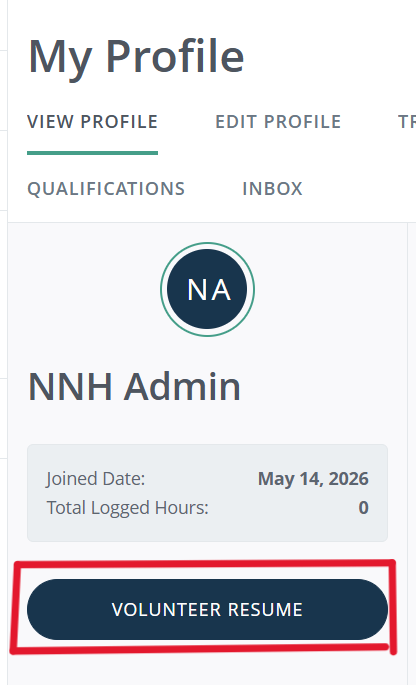
If you need your hours documented in a different format, reach out to kbagley@nnhouse.org and we'll work with you from there.

